
Duplicate Checking
Optimizing Your ROI with Lead Generation Software Duplicate Prevention
Maintaining a clean database is the cornerstone of a profitable lead business. Using a lead generation software with duplicate prevention protects your margins and your reputation. When a system lacks automated prevention, you risk paying for the same data twice or selling a shared lead to a client who expects exclusivity.
By using a smart lead distribution platform, you can automate the identification of repeat submissions in real time. So that every record entering your pipeline is a unique opportunity, allowing you to scale your operations without the manual headache of cleaning up messy data sets. boberdoo allows for this level of automated precision, giving you full control over how and when a lead is flagged as a duplicate.
What are Duplicate Checks?
A duplicate check, often referred to as "de-duping," is a technical filter used to identify and manage records that represent the same individual or entity within your system. In the lead generation industry, duplicates are a common side effect of consumer behavior, such as a user hitting the "submit" button multiple times, refreshing a landing page or filling out forms on several different websites within the same niche.
These checks typically look at specific "match keys," such as:
Email Addresses: The most common identifier for uniqueness.
Phone Numbers: For preventing multiple agents from calling the same person.
IP Addresses or Device IDs: Used to prevent "bot" spam or rapid-fire submissions from the same source.
Effective duplicate checking makes sure that once a lead is captured, any subsequent attempt to submit the same information is blocked, merged, or routed according to your specific business rules. By understanding and implementing these checks, your sales team or buyers will always be working with fresh, high-quality data.
It’s hard to find something in the lead generation business that’s more of a hassle than duplicate leads. Whether you’re buying them or selling them, via web, phone, or ping post, nobody likes the refund process and credibility damage that comes with dealing with information that’s already gone through the system.
boberdoo has developed a sophisticated system to check for duplicates, but it can be complicated at times. This page is a rundown of how boberdoo’s De-Dupe system works, what you can do with it, and what we can customize to help you be as efficient as possible with your lead business.
How Duplicate Checking Works
On the Insert Level
The boberdoo system checks for duplicates in two different ways. On the insert level, the system checks duplicates as soon as the lead hits the system. For each individual lead type of yours, we can customize the system to look back a certain number of days to see if there is any repeated information. The type of information that the system checks is also customizable. For example, your health insurance vertical could look for repeat e-mails within the last thirty days, while your life insurance vertical could look for both repeat e-mails and phone numbers within the last forty-five days. Like much of our system, the key is flexibility, and our duplicate check system is no exception.
On the Partner Level
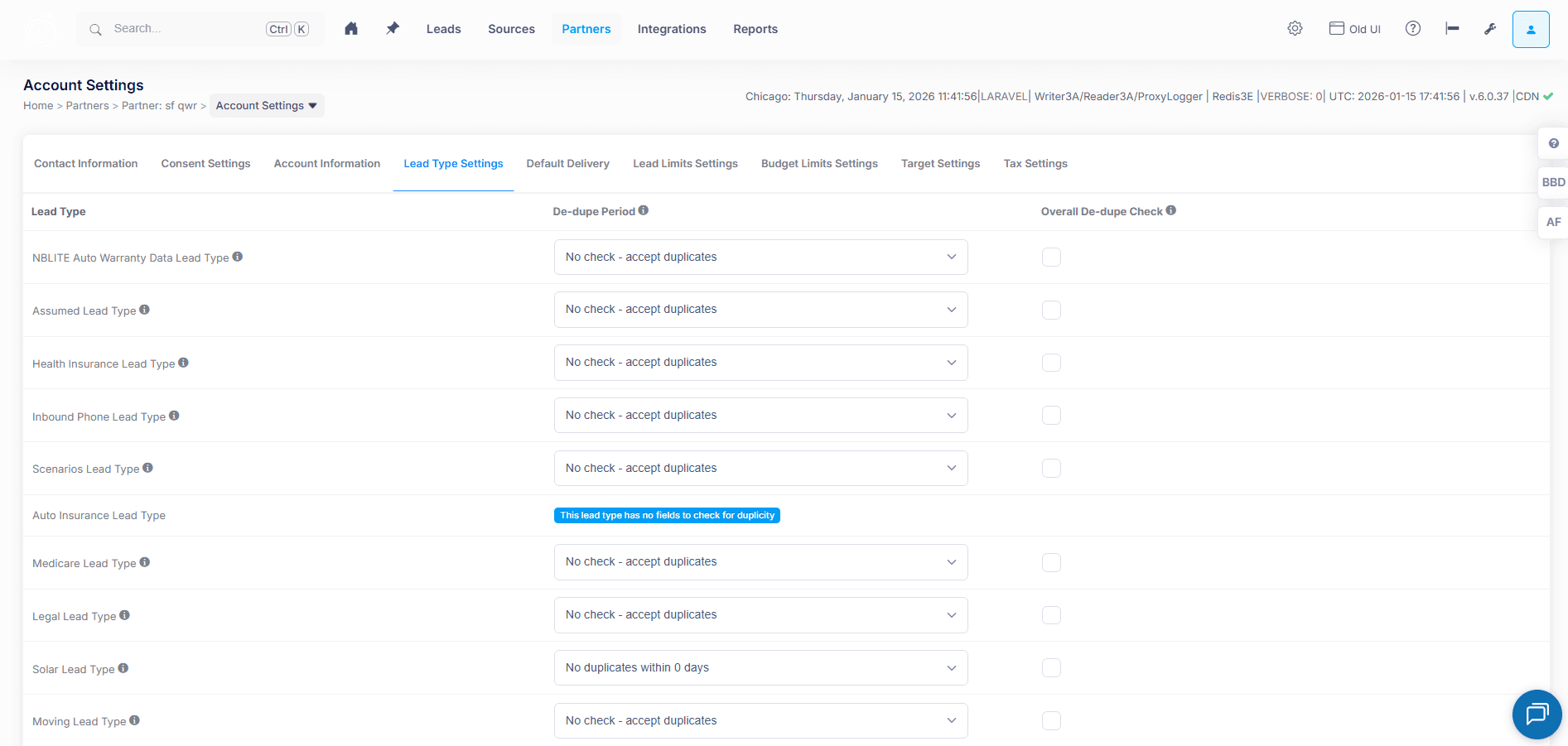
On the partner level, the boberdoo system checks for duplicates a second time once the lead is matched to a partner. This means that this lead has passed the system-wide duplicate checker once already. The duplicate check on the partner level sees if that specific partner has already purchased that lead in the time period selected from the De-Dupe Period dropdown in their account. This is available under the Account Settings > Lead Type Settings > De-dupe Period setting. This setting also gives the option of not checking for duplicates, which will prevent the partner from rejecting any duplicate leads within the De-dupe Period.
Overall De-Dupe Check
How It Works
The Overall De-dupe Check can be enabled/disabled per lead type for each partner account. If enabled, it checks if the same duplicate check field (e.g. Phone, Email) has EVER been in the system before. If so, that lead cannot match to this partner – even if the lead is 6 months, 2 years, or 10 years old.
Duplicate Checks by Lead Type
Web leads are the most basic, often having a longer de-dupe period to keep leads fresh with high volume. Phone leads may forego de-dupe periods in case of call failures – it would be remiss to reject a customer calling back after a disconnect.
Ping Post Duplicate Checking
In ping post, leads are duplicate checked when the lead enters the system and when the full contact information is sent, not when the initial ping is sent. The entire bidding system runs until the post is sent, at which time the lead is checked. If found to be a duplicate to the first buyer, the lead follows the source settings – either going unmatched or being resold to another buyer.
Frequently Asked Questions
The system checks for duplicates as soon as the lead enters. For each lead type, you can customize which fields are checked and the lookback period in days.
After a lead passes the system-wide checker and matches to a partner, a second check verifies if that partner has already purchased the same lead within the De-Dupe Period set in their account.
A separate setting that, when enabled, checks if the duplicate check field has EVER been in the system before. If so, the lead cannot match to that partner regardless of how old it is.
Leads are checked when entering the system and when the full contact information is posted, not during the initial ping. If a duplicate is found, the lead follows the source settings for handling unmatched leads.
Ready To Get Started?
Fill out the form below to schedule a demo with one of our lead distribution experts.