
Live Transfers with Data Matching (Full Response Method)
Live transfers with data matching full response method is a custom call routing option within the boberdoo system. See how it works here.
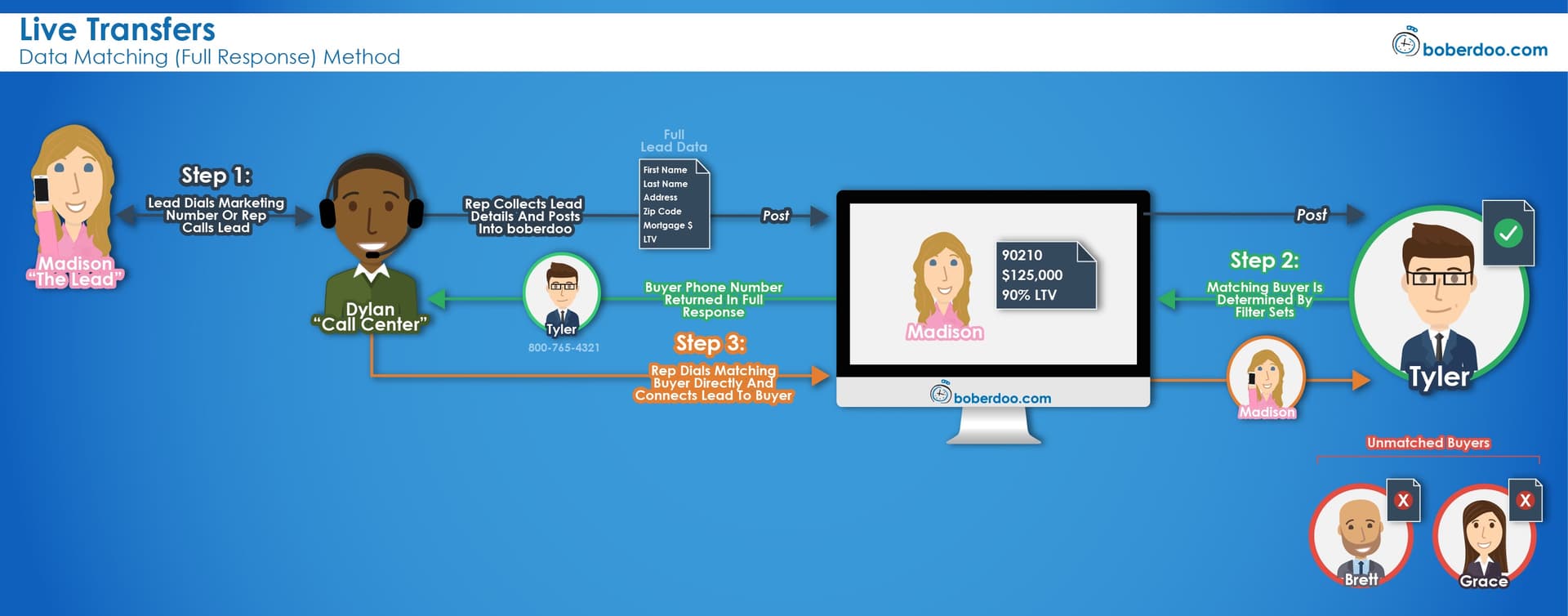
What Are Live Transfers with Data Matching (Full Response)?
Overview
When using live transfers with data matching, the live call is transferred and sold to the buyer based on data collected by the call center rep during the initial call. For example, the rep collects the lead's zip code, mortgage amount and LTV, then these fields determine the best buyer before a call is placed.
Step 1: Collect & Post Data
A lead calls into a call center or a call center places an outbound call. The call center rep collects additional information and submits it via a form that posts the data lead into the boberdoo system. Like a normal web lead, this lead matches with a buyer based on priority or price and is automatically delivered to them.
Step 2: Receive Buyer Information
The system returns the matching buyer's information with the phone number at which they would like to be reached. The response from the single matching buyer is returned to the call center rep immediately upon posting.
Step 3: Transfer the Call
The call center rep dials the buyer's phone number provided in the response to connect the lead with the buyer. Once successfully connected, the rep introduces the two parties and drops from the call. The buyer now has both the data and the live phone call.
Pros
This method provides better filtering options than live transfers with call matching because the buyer is determined based on data collected by the sales rep. It is also a simpler process for the call center rep than the Ping Post Method.
Cons
The data portion of the lead is delivered to the buyer before the call, but there is no guarantee the buyer picks up the phone – yet they receive the data regardless. This process also has a maximum of one matching buyer, whereas the Ping Post Method gives you the option of multiple potential buyers.
Getting Started With Live Transfers
If you are currently using the boberdoo system, please create a support ticket to get started. If you are not a boberdoo client, fill out the form below to get set up. Visit our live transfers page to explore additional routing logic.
Explore boberdoo Lead Distribution
Frequently Asked Questions
The call center rep collects lead data, posts it to boberdoo to find a matching buyer, receives the buyer's contact info, and transfers the live call to that buyer.
Better filtering than call matching because buyer selection is based on collected data fields. It is also simpler for the call center rep than the Ping Post Method.
There is no guarantee the buyer picks up the phone, yet they receive the data lead regardless. This method also supports a maximum of one matching buyer per lead.
Ready To Get Started?
Fill out the form below to schedule a demo with one of our lead distribution experts.